Software as a Service: A Beginner to Advanced Guide
Learn SaaS from beginner to advanced concepts, including benefits, types, features, pricing, security, and examples.
Introduction
Software as a Service (SaaS), commonly known as SaaS, has transformed how people access, use, and manage software. Instead of installing programs directly on a computer, users can access SaaS applications through the internet. As a result, businesses and individuals can use software from almost anywhere with an internet connection.
Moreover, SaaS makes software easier to manage, maintain, and update. Providers handle software updates, security improvements, and infrastructure, so users can focus on their core tasks without managing complex installations.
Today, businesses use SaaS solutions for communication, accounting, customer relationship management (CRM), project management, human resources, marketing, and many other business functions. For example, teams can collaborate online, manage customer data, track projects, and automate repetitive tasks using cloud-based software.
What Is Software as a Service?
Software as a Service is a way to deliver software over the internet. A provider keeps the software running on their servers. Users can reach the software using a web browser or a mobile app. The provider takes care of the servers, the system setup, regular updates and security work. This means users don’t need to worry about setting things up or keeping the software current.
For example a company might not buy software. Install it on every work computer. Instead they can sign up for a service. Then employees can use the software from any device with an internet connection. This makes things easier and more flexible.
How SaaS Is Different From Traditional Software
I find that traditional software often needs installation, local maintenance and manual updates. SaaS moves much of this work to the service provider so SaaS users do not have to handle updates.
Traditional Software
Installed Locally: The software is installed directly on the user’s computer or organization’s servers.
Manual Updates: Users or IT teams are often responsible for downloading and installing software updates.
Dedicated Infrastructure: It may require servers, storage, and other hardware to run the software.
License-Based: Usually purchased through a one-time license or long-term licensing agreement.
Local Data Storage: Data is often stored on the user’s computer or the organization’s own servers.
SaaS (Software as a Service)
Accessed Online: Users access the software through the internet, usually using a web browser or app.
Automatic Updates: The service provider manages updates, maintenance, and new features.
Provider-Managed Infrastructure: The provider manages servers, storage, security, and other infrastructure.
Subscription-Based: Usually offered through monthly or yearly subscription plans.
Cloud Data Storage: Data is generally stored on cloud servers managed by the service provider.
How Does SaaS Work?
Software as a Service (SaaS) combines software applications with cloud infrastructure, databases, networks, and internet connectivity. Instead of installing and maintaining software on individual computers, users access SaaS applications online.
The SaaS provider hosts the application on cloud infrastructure and manages the underlying technology. Users simply connect to the application through a web browser or mobile app. As a result, they can access their software from almost any device with an internet connection.
When a user performs an action, the SaaS application processes the request and communicates with the required databases or cloud services. For example, when you update a customer record in a CRM platform, the application sends the information to the appropriate database and retrieves the updated data when needed.
A basic SaaS workflow looks like this:
User → Internet → SaaS Application → Server → Database → Response
Behind the scenes, the SaaS provider manages servers, databases, security, updates, backups, and other technical components. Therefore, users can focus on using the application instead of managing complex IT infrastructure.
Additionally, cloud-based SaaS architecture allows providers to update and improve applications centrally. Consequently, users can access new features, performance improvements, and security updates without manually installing new software versions.
What Are the Main Features of SaaS?
A SaaS application usually has features that make online software easy to use and easy to grow.
Common SaaS Features:
Web-based access
software updates
Subscription-based access
Centralized data management
User account management
Integration, with other tools
Scalable infrastructure
Data backup
Security controls
Multi-device access
These features can be different depending on the application and the company that provides it.
How Does SaaS Work in Cloud Computing?
SaaS is one of the cloud computing service models. It lets users access software that is already built and ready to use. There is no need to worry about the systems or hardware behind it.
Cloud computing usually has three service models:
Infrastructure as a Service (IaaS): IaaS provides access to essential computing resources such as virtual servers, storage, networking, and processing power. Businesses can use these resources to build and manage their own IT environments.
Platform as a Service (PaaS): PaaS provides developers with tools, frameworks, and platforms for building, testing, deploying, and managing applications. Therefore, developers can focus on creating applications instead of managing the underlying infrastructure.
Software as a Service (SaaS): SaaS delivers complete software applications that users can access directly through the internet. For example, businesses can use SaaS applications for accounting, customer relationship management, communication, project management, and marketing without complex setup.
SaaS works at the application level. The company that provides the software handles most of the technology including maintenance, updates and security. This means users can focus on using the software to manage it.
What Are the Benefits of SaaS?
SaaS can provide advantages for individuals and organizations.
Lower Upfront Costs: Many SaaS solutions use subscription pricing. SaaS helps businesses avoid initial software and infrastructure expenses.
Easy Access: Users can often access applications from laptops, desktops, tablets and smartphones. SaaS enables access on devices.
Faster Deployment: Companies can start using SaaS applications without setting up complex local infrastructure. SaaS speeds up deployment.
Automatic Updates: The provider can release improvements, bug fixes and new features without requiring every user to install an update. SaaS delivers updates automatically.
Flexible Scaling: Businesses can often. Remove users as their needs change. SaaS allows scaling.
Easier Maintenance: The provider handles much of the infrastructure and software maintenance. SaaS simplifies maintenance.
What Are Common Examples of SaaS?
SaaS covers different categories of software.
Common examples include:
Accounting software
Project management tools
Marketing platforms
Online collaboration tools
Enterprise resource planning systems
File storage applications
Customer support platforms
These products show how SaaS can support both business activities. It’s easy to see how useful they are in life and in work settings. Many people use them every day without realizing they’re using SaaS. Some tools help with team work, others, with money or customer info. SaaS is software that runs on the internet and helps you get things done.
What Types of SaaS Applications Are Available?
SaaS applications can help with every part of a business.
Business Management: Companies can use software to handle operations, workflows, documents and internal processes.
Customer Management: CRM applications help businesses keep track of customer information, sales activities, communication and support.
Finance and Accounting: Online accounting applications can help businesses handle invoices, expenses, payments and financial reports.
Human Resources: HR platforms can help with employee records, hiring, attendance, payroll and performance management.
Marketing: Marketing applications can help with email campaigns, data analysis, content management, advertising and customer interaction.
How Does the SaaS Business Model Work?
A SaaS business model typically builds software. Lets customers use it by paying regularly.
Revenue can come from:
subscriptions
Annual subscriptions
Usage‑based pricing
Per‑user pricing
Feature‑based plans
Enterprise agreements
Freemium plans
The provider must balance customer value, operating costs, pricing, retention and growth.
What Is SaaS Architecture?
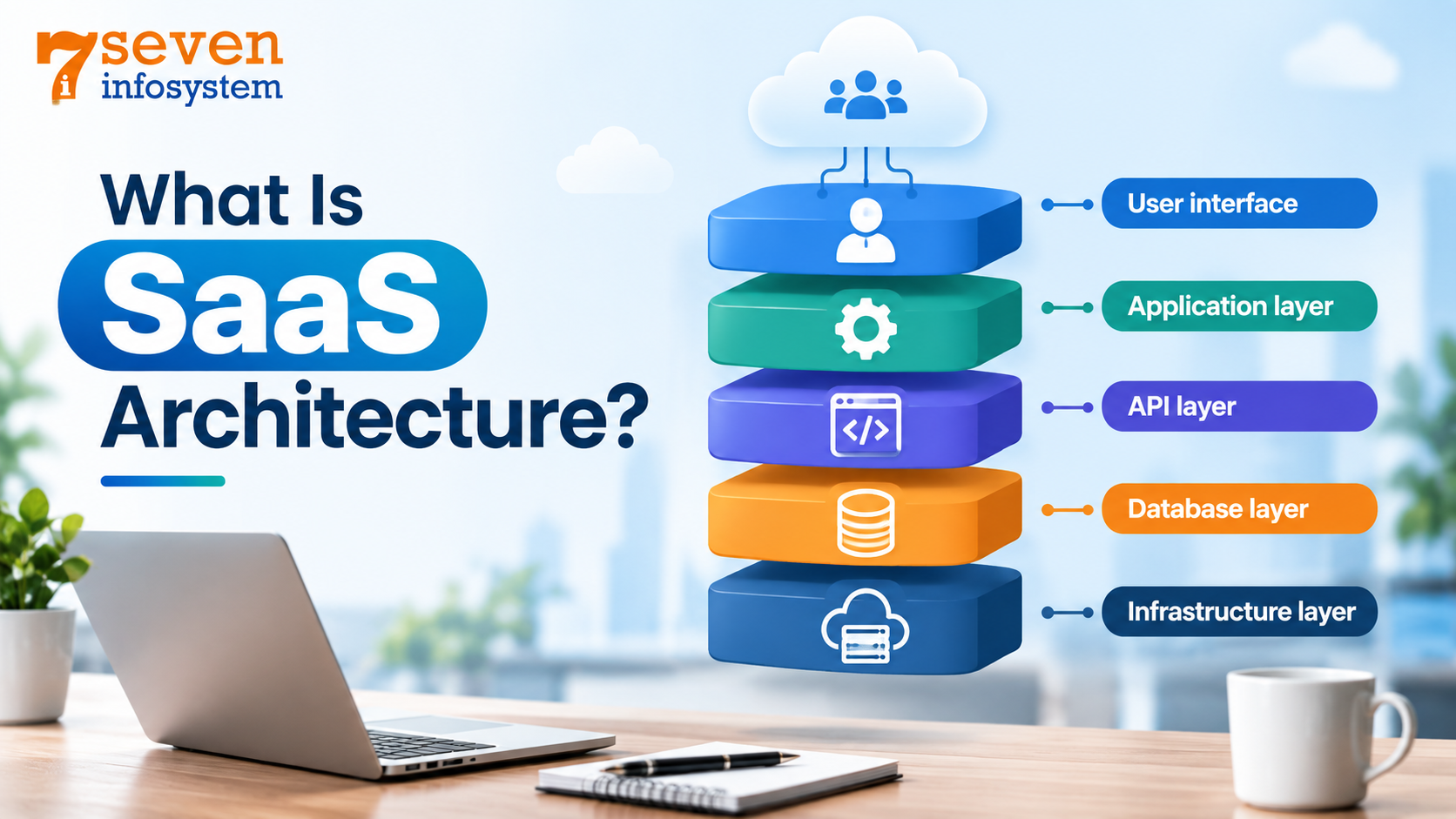
SaaS architecture explains how the components of an online application work
A typical architecture may include:
User interface – where users interact with the application.
Application layer – processes business logic.
API layer – connects the application with services.
Database layer – stores application data.
Infrastructure layer – provides computer power, data storage and connection resources.
A good design needs to allow for growing, being dependable, being safe working fast and being easy to fix. I believe that these qualities keep the system running and protect user data.
How Is SaaS Security Managed?
SaaS security combines security tools, policies, and best practices to protect applications, user accounts, and business data. In addition, SaaS providers typically use data encryption, secure authentication, access controls, firewalls, monitoring tools, and regular security testing to reduce potential risks.
Identity and access management (IAM) also plays an important role in SaaS security. For example, multi-factor authentication (MFA), role-based access controls, and regular access reviews help ensure that only authorized users can access sensitive information. As a result, businesses can reduce the risk of unauthorized access and protect important data.
Furthermore, SaaS providers often use automated backups and data recovery systems to protect information from accidental loss, system failures, or security incidents. These measures allow businesses to restore critical data more quickly when problems occur. Therefore, reliable backup and recovery processes form an important part of a strong SaaS security strategy.
Before choosing a SaaS provider, businesses should also evaluate its security practices and standards. For instance, companies can review data protection measures, compliance requirements, backup procedures, incident response plans, and service availability. Additionally, businesses should check whether the provider follows relevant security frameworks and regulations.
Finally, companies should compare a SaaS provider's security features with their specific business requirements. By reviewing these factors carefully, organizations can choose a secure SaaS solution that protects sensitive information while supporting their operational needs.
What Should You Check Before Choosing a SaaS Product?
Choosing the SaaS product is not just about comparing prices. I believe businesses should look at their needs, their future goals and their daily operations. The best SaaS product should be easy to use, secure, reliable and able to grow with the business.
Features
Check whether the SaaS product provides the features your business actually needs. Look for functions, automation options, reporting tools and user management features. Avoid choosing software simply because it offers a number of features.
Security
Security is essential when your business data is stored online. I always look for data encryption, secure login methods, access controls, backups and other security measures. I also review how the provider handles data protection and security incidents.
Integration
I find that a SaaS application should work well with the tools your business already uses. Check whether the SaaS application supports integration, with CRM systems, accounting software, email platforms, payment tools or other applications. Good integration can reduce work and improve workflow.
Pricing
Compare the cost before you sign up. Look at yearly plans charges based on users extra features that cost more, how much storage is allowed and any other extra charges. Pick a pricing plan that works with your money and doesn't make you lose things.
Scalability
Your software should grow with your business. Make sure software can add users, increase storage upgrade features or handle more customers as requirements grow. A scalable SaaS solution can stop the need for software changes.
Support
Reliable customer support can really change things when problems come up. Make sure the company provides email, live chat, phone help, guides or technical help. Great support can help your team fix problems and use the program well.
How Can Businesses Implement SaaS Successfully?
Implementing SaaS successfully requires planning and a clear understanding of business needs. A structured approach helps businesses select the solution, get their teams ready and avoid extra expenses.
1. Identify Your Business Needs
Start by thinking about the issues you hope the SaaS solution will fix. List out the things that're most important to your company. List the features you need who will use the software and how they will use it. Think about the steps in your work and what results you hope to see. This makes it easier to pick a tool that fits your goals.
2. Choose the Right SaaS Solution
I suggest you compare SaaS products by looking at the features, security, pricing, integrations, scalability and support of each SaaS product. Check customer reviews and product demonstrations when available and choose a SaaS product that meets your needs and future requirements.
3. Plan the Implementation
I think a clear plan before starting the software is essential. Decide who will run the software system, set deadlines, give tasks and get the needed data ready. A good plan can help the change go smoothly.
4. Prepare and Train Your Team
Employees must clearly see how the new software works. Give employees training, written guides and live demos before the rollout. Employees should ask questions. Share any problems while the change happens.
5. Integrate and Migrate Data
Connect the SaaS application with your business tools where needed. If you are switching from another system, move the data carefully. Review the transferred information to make sure it is correct and fully complete.
6. Monitor and Improve Performance
After the software is put into use, watch how employees use it and see if it matches your business goals. Keep an eye on how it works, how much it costs, what users say and how much more work people can get done. If something is not right, change it so you can get more from the SaaS solution.
Future of SaaS
SaaS keeps changing as cloud systems robot- tools, smart machines, connections between programs and data methods get better.
Future SaaS tools might focus more on robot- actions, smart ways to do work, quick data reviews, custom experiences joining with other programs and better protection.
Companies will also keep checking SaaS options by looking at business results instead of just what features they have.
Cloud-Native Development: SaaS applications will continue to use cloud technologies to improve scalability, performance, and reliability.
Low-Code/No-Code Platforms: More users will be able to create applications and automate workflows without advanced programming skills.
Industry-Specific SaaS: Specialized SaaS solutions will continue to grow for industries such as healthcare, education, finance, retail, and manufacturing.
Improved Collaboration: SaaS will support real-time collaboration, making it easier for teams to work together from different locations.
Focus on Sustainability: Cloud providers and SaaS companies will increasingly work toward reducing energy consumption and improving the environmental efficiency of their services.
AI-Powered Software: SaaS platforms will increasingly use AI to automate tasks, analyze data, and provide intelligent recommendations.
Conclusion
Software as a Service or SaaS has become a part of how software is delivered today. It lets people use applications over the internet while the provider runs most of the servers, keeps them updated and fixes problems.
SaaS has changed the way software is delivered and used by providing applications through the internet instead of requiring local installation. It reduces the need for businesses to manage infrastructure, updates, and maintenance themselves. SaaS offers benefits such as easy access, automatic updates, flexible scaling, lower upfront costs, and integration with other tools. It is used across areas such as communication, accounting, customer management, HR, marketing strategies, and project management. As cloud technology, AI, automation, and integration continue to develop, SaaS is expected to become more intelligent, flexible, secure, and useful for businesses of different sizes
FAQs
1. What is SaaS?
SaaS (Software as a Service) is a software delivery model in which applications are provided over the internet. Users can access the software through a web browser or mobile app, while the provider manages servers, updates, security, and maintenance.
2. How is SaaS different from traditional software?
Traditional software is generally installed locally and may require manual updates, dedicated infrastructure, and local maintenance. SaaS is accessed online, with the provider managing updates, infrastructure, and much of the maintenance.
3. What are the main benefits of SaaS?
The main benefits include lower upfront costs, easy access from different devices, faster deployment, automatic updates, flexible scaling, and easier maintenance.
4. What are some common examples of SaaS applications?
Common SaaS applications include email and communication tools, customer relationship management (CRM) systems, accounting software, project management tools, HR software, marketing platforms, collaboration tools, and file storage applications.
5. How is SaaS security managed?
SaaS security can include data encryption, secure authentication, access controls, firewalls, monitoring, security testing, multi-factor authentication, role-based permissions, backups, and recovery systems. Businesses should also review a provider's data protection and security practices before choosing a service.
6. What is the future of SaaS?
The future of SaaS is expected to include greater use of AI, automation, cloud-native technologies, low-code/no-code platforms, industry-specific applications, improved collaboration, and stronger focus on sustainability. These developments can make SaaS more intelligent, flexible, and scalable.